Theory – IV

Container class

Stores a collection of other objects and provide sequential or direct access to them. The string class is a container that holds chars. All container classes access the contained elements safely and efficiently by using iterators. Container class is a class that hold group of same or mixed objects in memory.

Containers of pointers provide containers to hold the objects that are heap-allocated in manner that is exception-safe and with minimum overhead.

Types

  • Sequence containers: array, vector, list
  • Container adaptors: stack, queue, priority_queue
  • Associative containers: set, map

Functions that:

  • Create an empty container (via a constructor)
  • Insert a new object into the container
  • Remove an object from the container
  • Report the number of objects currently in the container
  • Empty the container of all objects
  • Provide access to the stored objects
  • Sort the elements (optional)

Example:

Creating containers:  vector<int> numbers(7);
Extending a container:  vector<int> v; // creates an empty vector
                        v.push_back(3);
                        v.push_back(8);

Accessing elements of a container:   v[1]=3;
                                     v[2]=5;
                                     v[3]=v[1]+v[2];


find - looks for a value
vector<int>::iterator it;
  ...
  it = find (v.begin(), v.end(), 30);
  if (it ==  v.end())
    cout << "30 not found " << endl;
  else
    cout << "30 is in v " << endl;

count
vector<int> v;
cout << "30 is in v "  << count(v.begin(), v.end(), 30) << " times" << endl;

for_each
    void square(int n) {
       cout << n*n << endl;
    }

    vector<int> v;

    // print the square of all the values in v 
    for_each(v.begin(), v.end(), square);

transform
    int square(int n) {
       return  n*n;
    }

    vector<int> v;

    // replace each value in v by its square
    transform(v.begin(), v.end(), square);

Replace
replace(v.begin(), v.end(), 7,3);

fill 
    fill(v,9); 

copy
 vector<int> v(10);
for (int i=0;i<v.size();i++)
  v[i]=i;
list<int> l(10);
copy(v.begin(), v.end(),l.begin());

remove
it=remove (v.begin(), v.end(), 7);

min_element
it=min_element(v.begin(), v.end());

Adapter class

Provides an empty implementation of all methods in an event listener interface i.e this class itself write definition for methods which are present in particular event listener interface. However these definitions does not affect program flow or meaning at all.

useful when you want to receive and process only some of the events that are handled by a particular event listener interface.

Suppose you want to use MouseClicked Event or method from MouseListener, if you do not use adapter class then unnecessarily you have to define all other methods from MouseListener such as MouseReleased, MousePressed etc.

But If you use adapter class then you can only define  MouseClicked method and don’t worry about other method definition because class provides an empty implementation of all methods in an event listener interface.

xyz

Example:

import java.awt.*;
import java.awt.event.*;
import java.applet.*;

/*
<applet code="MainClass" height="800" width = "500">
</applet>
*/

public class MainClass extends Applet 
{
     public void init()                   
     {
           addMouseListener(new AdapterTest(this));
      }
}   

// AdapterTest Created
class AdapterTest extends MouseAdapter  
{
       MainClass MainClassObj;  
       public AdapterTest(MainClass MainClassObj) 
       {
              this.MainClassObj=MainClassObj;           
        } 

        public void mouseClicked(MouseEvent me)
        {
                 MainClassObj.showStatus("Mouse Has Been Clicked ");
         }
}

Memory space for a program has two parts:

  • Data segment

A data segment is a portion of virtual address space of a program, which contains the global variables and static variables that are initialized by the programmer. The size of this segment is determined by the values placed there by the programmer before the program was compiled or assembled, and does not change at run-time. The data segment is read-write, since the values of the variables can be altered at run-time.

Example – Stack, Heap, uninitialized and initialized data

  • Code segment or Text segment

It is one of the sections of a program in an object file or in memory, which contains executable instructions. It has a fixed size and is usually read-only. If the text section is not read-only, then the particular architecture allows self-modifying code.

Example – main()

xyz

Finalize method

Before an object is garbage collected, the runtime system calls its finalize() method. The intent is for finalize() to release system resources such as open files or open sockets before object gets collected.

By using finalization, you can define specific actions that will occur when an object is just about to be reclaimed by the garbage collector. It is not called when an object goes out-of-scope.

To add a finalizer to a class, you simply define the finalize() method. The java run time calls that method whenever it is about to recycle an object of that class. Inside the finalize() method you will specify those actions that must be performed before an object is destroyed.

protected void finalize()   // protected is used to prevent access by code defined outside its class.
{
     // finalization code here
}

Theory – III

Inheritance

Single Inheritance: It is the inheritance hierarchy wherein one derived class inherits from one base class.
Multiple Inheritance: It is the inheritance hierarchy wherein one derived class inherits from multiple base class(es)
Hierarchical Inheritance: It is the inheritance hierarchy wherein multiple subclasses inherit from one base class.
Multilevel Inheritance: It is the inheritance hierarchy wherein subclass acts as a base class for other classes.
Hybrid Inheritance: The inheritance hierarchy that reflects any legal combination of other four types of inheritance.

xyz

Friend class/function

A friend function of a class is defined outside that class’ scope but it has the right to access all private and protected members of the class. friends are not member functions.

class Distance
{
    private:
        int meter;
    public:
        Distance(): meter(0){ }
        friend int func(Distance);  //friend function
};

Immutable object – state cannot be modified after it is created. Immutability can have a performance cost, since when an object cannot be mutated we need to copy it if we want to write to it.

Immutable objects are often useful because

  • they are inherently thread-safe.
  • Immutable objects are good Map keys and Set elements, since these typically do not change once created.
  • References to immutable objects can be cached as they are not going to change.

Make a class immutable by following these guidelines:

  • ensure the class cannot be overridden – make the class final, or use static factories and keep constructors private.
  • make fields private and final.
  • force callers to construct an object completely in a single step, instead of using a no-argument constructor combined with subsequent calls to setXXX methods
  • do not provide any methods which can change the state of the object in any way – not just setXXX methods, but any method which can change state.
  • If the instance fields include references to mutable objects, don’t allow those objects to be changed:
    • Don’t provide methods that modify the mutable objects.
    • Don’t share references to the mutable objects.

Interface

Interface were primarily made popular by Java.
Below are the nature of interface and its C++ equivalents:

  1. interface can contain only body-less abstract methods; C++ equivalent is pure virtual methods, though they can/cannot have body
  2. interface can contain only static final data members; C++ equivalent is static const data members which are compile time constants
  3. Multiple interface can be implemented by a Java class, this facility is needed because a Java class can inherit only 1 class; C++ supports multiple inheritance straight away with help of virtual keyword when needed

Because of point 3 interface concept was never formally introduced in C++. Still one can have a flexibility to do that.

Interface in Java

An interface is a collection of abstract methods. A class implements an interface, thereby inheriting the abstract methods of the interface.

  • You cannot instantiate an interface.
  • An interface does not contain any constructors.
  • All of the methods in an interface are abstract.
  • An interface is not extended by a class; it is implemented by a class.
  • An interface can extend multiple interfaces.

Interfaces have the following properties:

  • An interface is implicitly abstract. You do not need to use the abstract keyword when declaring an interface.
  • Each method in an interface is also implicitly abstract, so the abstract keyword is not needed.
  • Methods in an interface are implicitly public.

Example

public interface NameOfInterface
{
   //Any number of final, static fields
   //Any number of abstract method declarations\
}

When overriding methods defined in interfaces there are several rules to be followed:

  • Checked exceptions should not be declared on implementation methods other than the ones declared by the interface method or subclasses of those declared by the interface method.
  • The signature of the interface method and the same return type or subtype should be maintained when overriding the methods.
  • An implementation class itself can be abstract and if so interface methods need not be implemented.

When implementation interfaces there are several rules:

  • A class can implement more than one interface at a time.
  • A class can extend only one class, but implement many interfaces.
  • An interface can extend another interface, similarly to the way that a class can extend another class.

Implement vs. Extends

Implements

/* File name : Animal.java */
interface Animal {

   public void eat();
   public void travel();
}

* File name : MammalInt.java */
public class MammalInt implements Animal{

   public void eat(){
      System.out.println("Mammal eats");
   }

   public void travel(){
      System.out.println("Mammal travels");
   } 

   public int noOfLegs(){
      return 0;
   }

   public static void main(String args[]){
      MammalInt m = new MammalInt();
      m.eat();
      m.travel();
   }
}

Extends

public interface Sports
{
   public void setHomeTeam(String name);
   public void setVisitingTeam(String name);
}

//Filename: Hockey.java
public interface Hockey extends Sports
{
   public void homeGoalScored();
   public void visitingGoalScored();
   public void endOfPeriod(int period);
   public void overtimePeriod(int ot);
}

The Hockey interface has four methods, but it inherits two from Sports; thus, a class that implements Hockey needs to implement all six methods.

Extending Multiple Interfaces:

public interface Hockey extends Sports, Event

NOTE

class Sub extends Super implements interface // extends before implements

Final

Final can be:

  1. variable
  2. method
  3. class

final variable that have no value it is called blank final variable or uninitialized final variable. It can be initialized in the constructor or by calling this() only. The blank final variable can be static also which will be initialized in the static block only.

Static blocks are also called Static initialization blocks . A static initialization block is a normal block of code enclosed in braces, { }, and preceded by the static keyword.

Example:

class A{  
static final int data;  //static blank final variable  
      static { data=50;}  
public static void main(String args[]){  
       System.out.println(A.data);  
     }  
}

Final variable

If you make any variable as final, you cannot change the value of final variable


Final Method

If you make any method as final, you cannot override it. It can be inherited.

Constructor can’t be final as they are never inherited.

Final Class

If you make any class as final, you cannot extend it.

Final Parameter

If you declare any parameter as final, you cannot change the value of it.

Const Vs Final

A const object can only call const methods, and is generally considered immutable.

const Person* person = myself;
person = otherPerson; //Valid... unless we declared it const Person* const!
person->setAge(20); //Invalid, assuming setAge isn't a const method (it shouldn't be)

A final object cannot be set to a new object, but it is not immutable – there is nothing stopping someone from calling any set methods.

final Person person = myself;
person = otherPerson; //Invalid
person.setAge(20); //Valid!

Java has no inherent way of declaring objects immutable; you need to design the class as immutable yourself.

When the variable is a primitive type, final/const work the same.

const int a = 10; //C++
final int a = 10; //Java
a = 11; //Invalid in both languages

FEW POINTS

  • Final member variable must be initialized at the time of declaration or inside constructor.
  • Local final variable must be initializing during declaration.
  • All variable declared inside java interface are implicitly final.
  • final class can not be abstract in java.
  • Final methods are bonded during compile time also called static binding.
  • Making a class, method or variable final in Java helps to improve performance because JVM gets an opportunity to make assumption and optimization.
  • Making a collection reference variable final means only reference can not be changed but you can add, remove or change object inside collection.

Stack Unwinding

When an exception occurs, the function call stack is linearly searched for the exception handler, and all the entries before the function with exception handler are removed from the function call stack.

When an exception is thrown and control passes from a try block to a handler, the C++ run time calls destructors for all automatic objects constructed since the beginning of the try block. The automatic objects are destroyed in reverse order of their construction.

Issues related to stack unwinding:

  • you should never throw an exception before any existing exception has been handled. This means that the stack unwinding process should never throw an exception

Theory – II

How to overload main

To overload main, it is necessary to use class & declare main as member function

class Overloading1{
     public static void main(int a){
     System.out.println(a);
}

public static void main(String args[]){
        System.out.println("main() method invoked");
         main(10);
   }
}

New is a c++ operator which will dynamically allocate memory and call constructor of the class to initialize memory for which object is created. It Doesn’t need size and gets casted appropriately and returns the exact datatype.

abcd

Ifdef -> if following is defined
Ifndef -> if following is not defined
Commenting  code

#if 0
   Commented code
#endif

xyz

Constructor

Copy constructor – creates object by initializing it with an object of same class, which was already created. The copy constructor is used to:

  • Initialize one object from another of the same type.
  • Copy an object to pass it as an argument to a function.
  • Copy an object to return it from a function.

Example:

classname (const classname &obj) {
   // body of constructor
}

Conversion constructor – if class has constructor with 1 argument, it is conversion constructor as it allows automatic conversion of the class being constructed.

Example

class Test 
{
 private:
   int x;
 public:
   Test(int i) {x = i;}
   void show() { cout<<" x = "<<x<<endl; }
};
 
int main()
{
 Test t(20);
 t.show();
 t = 30; // conversion constructor is called here.
 t.show();
 getchar();
 return 0;
}

Static member function can’t be constant or volatile as const affects the this pointer of nonstatic function whereas static function doesn’t have this pointer.

No virtual constructor is allowed but virtual destructor is allowed to remove object from derived class.

Virtual constructor

“virtual” allows us to call a function knowing only any interfaces and not the exact type of the object. To create an object you need complete information. In particular, you need to know the exact type of what you want to create. Consequently, a “call to a constructor” cannot be virtual.

Virtual destructors are used to delete an instance of a derived class through a pointer to base class:

class Base 
{
    // some virtual methods
};

class Derived : public Base
{
    ~Derived()
    {
        // Do some important cleanup
    }
}

Base *b = new Derived();
// use b
delete b; // Here's the problem!

Since Base’s destructor is not virtual and b is a Base* pointing to a Derived object, delete b has undefined behaviour. In most implementations, the call to the destructor will be resolved like any non-virtual code, meaning that the destructor of the base class will be called but not the one of the derived class, resulting in resources leak.

To sum up, always make base classes’ destructors virtual when they’re meant to be manipulated polymorphically.

If you want to prevent the deletion of an instance through a base class pointer, you can make the base class destuctor protected and nonvirtual; by doing so, the compiler won’t let you call delete on a base class pointer.

Abstract class

Abstract class has atleast one pure virtual function as any class with at least 1 pure virtual function must be abstract because it needs to be extended so that method can actually be implemented.

An abstract method is just another way of describing the characteristics of a pure virtual function. Both just mean a method with no implementation provided that needs to be implemented in a sub-class before the class can actually be instantiated.

If we do not override the pure virtual function in derived class, then derived class also becomes abstract class.

Characteristics

  • Classes inheriting an abstract class must provide definition to the pure virtual function, otherwise they will also become abstract class.
  • Abstract classes can’t be instantiated, but pointers and references of Abstract class type can be created.
  • Abstract can have normal functions and variables along with pure virtual function.

Virtual function

Virtual function whose behavior can be overridden within inherited class by function with same signature.

A pure virtual function (or abstract function) in C++ is a virtual function for which we don’t have implementation, we only declare it. A pure virtual function is declared by assigning 0 in declaration. See the following example.

// An abstract class
class Test
{   
    // Data members of class
public:
    // Pure Virtual Function
    virtual void show() = 0;
   
   /* Other members */
};

Storage class

A storage class defines the scope (visibility) and life-time of variables and/or functions within a C++ Program. Types are:-

  • auto – default storage class for all local variables.
  • Register – should be stored in a register instead of RAM. Can’t have the unary ‘&’ operator as it doesn’t have memory location. should only be used for variables that require quick access such as counters
  • Static – instructs the compiler to keep a local variable in existence during the life-time of the program instead of creating and destroying it each time it comes into and goes out of scope. The static modifier may also be applied to global variables. When this is done, it causes that variable’s scope to be restricted to the file in which it is declared.
  • Extern – give a reference of a global variable that is visible to ALL the program files. When you use ‘extern’ the variable cannot be initialized as all it does is point the variable name at a storage location that has been previously defined.
  • Mutable – Mutable means “subject to change or alteration.” The mutable keyword allows constant member functions to modify mutable data members of constant structures and objects.

Extern

If you want a variable to be accessible across multiple files then define the variable as extern int count in a header file and import it across multiple files.

First File:

int count ;
extern void write_extern();
 
main()
{
   count = 5;
   write_extern();
}

Second File:

extern int count;
void write_extern(void)
{
   std::cout << "Count is " << count << std::endl;
}

xyz

Static

  1. If the static keyword is applied to a class, all the members of the class must be static.
  2. Static methods can only access static members of same class. Static properties are used to get or set the value of static fields of a class.
  3. Static constructor can’t be parameterized. Access modifiers can’t be applied on Static constructor, it is always a public default constructor which is used to initialize static fields of the class.

Mutable

There are some cases where data members are declaring as const, and later want to change the value of the const variable.In C++, it is not legal to change the const value, by using mutable it is possible. This keyword can be applied to only non-static and non-constant data members.

The mutable keyword allows constant member functions to modify mutable data members of constant structures and objects.

class mute{
 
public:
 int x ;
 mutable int y;  // mutable variable declaration
 mute() // constructor
 {
    x=10;
    y=10;
 }
};

int main()
{
   const mute m; // constant object
   //m.x=20; // Illegal cant change the data members in a constant object  
   m.y=20; // Legal, we can change , because its a mutable
}

Volatile

volatile keyword is intended to prevent the compiler from applying certain optimizations which it might have otherwise applied because ordinarily it is assumed variables cannot change value “on their own”.

Consider this code:

int some_int = 100;
while(some_int == 100)
{
   //your code
}

When this program gets compiled, the compiler may optimize this code, if it finds that the program never ever makes any attempt to change the value of some_int, so it may be tempted to optimize the while loop by changing it from while(some_int == 100) to simply while(true) so that the execution could be fast.

However, sometimes, optimization (of some parts of your program) may be undesirable, because it may be that someone else is changing the value of some_int from outside the program which compiler is not aware of, since it can’t see it; but it’s how you’ve designed it. In that case, compiler’s optimization would not produce the desired result!

So, to ensure the desired result, you need to somehow stop the compiler from optimizing the while loop. That is where the volatile keyword plays it’s role. All you need to do is this,

volatile int some_int = 100;

xyz

Operator overloading

Done so as to use operators with user-defined types or objects.

Overloaded operators are functions with special names the keyword operator followed by the symbol for the operator being defined.

class temp
{
   private:
      int count;
   public:
        temp():count(5){  }
        void operator ++() { 
        count=count+1; 
       }
       void Display() { cout<<"Count: "<<count; }
};
int main()
{
    temp t;
    ++t;        /* operator function void operator ++() is called */
    t.Display();
    return 0;
}

NOTE

  1. Operator overloading cannot be used to change the way operator works on built-in types. Operator overloading only allows to redefine the meaning of operator for user-defined types.
  2. There are two operators assignment operator(=) and address operator(&) which does not need to be overloaded. Because these two operators are already overloaded in C++ library. For example: If obj1 and obj2 are two objects of same class then, you can use code obj1=obj2; without overloading = operator. This code will copy the contents object of obj2 to obj1.
  3. Operator overloading cannot change the precedence of operators and associativity of operators. But, if you want to change the order of evaluation, parenthesis should be used.
  4. The operators that cannot be overloaded in C++ are ::(scope resolution), .(member selection), .*(member selection through pointer to function) and ?:(ternary operator).

Inline function

If a function is inline, the compiler places a copy of the code of that function at each point where the function is called at compile time which reduces the overhead of function calling. Inline function increases efficiency but if we make large function inline then it might lead to code bloat and affect speed as well. Call infine where function size is small and is getting called quite often.

Inline is a request to the compiler. Very complicated function like Recursive function, function containing static variable, function containing return statement or loop or goto or switch statements are not made inline even if we declare them so.Also small functions which are defined inside a class (ie their code is written inside the class) are taken as inline by the compiler even if we don’t explicitly declare them so. They are called auto inline functions.xyz

Static class

There are no static class in java or c++. There are static nested classes in Java.

But a class can be simulated to behave like a static class like this:

  • Declare your class final – Prevents extension of the class since extending a static class makes no sense
  • Make the constructor private – Prevents instantiation by client code as it makes no sense to instantiate a static class
  • Make all the members and functions of the class static – Since the class cannot be instantiated no instance methods can be called or instance fields accessed.

Theory – I

abcd

xyz

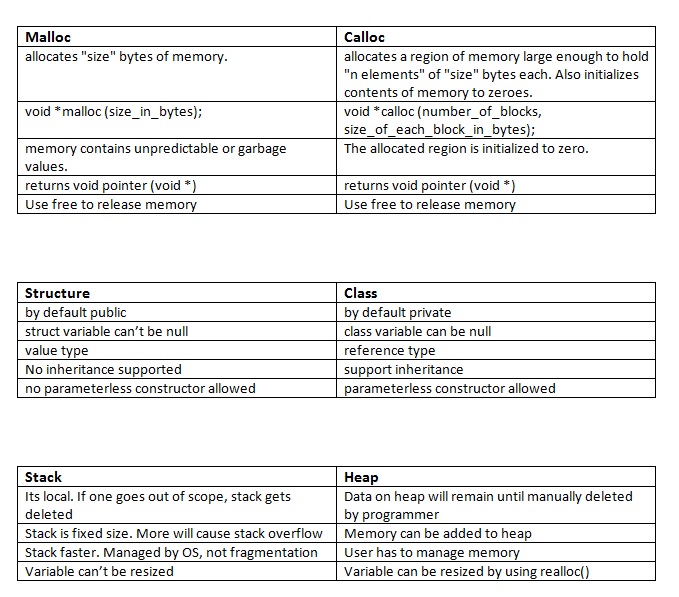
Stack and the heap both are stored in the computer’s RAM. In a multi-threaded application, each thread will have its own stack. But, all the different threads will share the heap. object can be stored on the stack if an object is created inside a function without using the “new” operator.

Once a function call runs to completion, any data on the stack created specifically for that function call will automatically be deleted. Any data on the heap will remain there until it’s manually deleted by the programmer.

Parsing / Reading XML file in Java

Sample XML file

<?xml version="1.0"?>
<students>
    <student>
        <name>John</name>
        <grade>B</grade>
        <age>12</age>
    </student>
    <student>
        <name>Mary</name>
        <grade>A</grade>
        <age>11</age>
    </student>
    <student>
        <name>Simon</name>
        <grade>A</grade>
        <age>18</age>
    </student>
</students>

Java code to parse above XML

import java.io.File;
import javax.xml.parsers.DocumentBuilder;
import javax.xml.parsers.DocumentBuilderFactory;
 
import org.w3c.dom.Document;
import org.w3c.dom.Element;
import org.w3c.dom.Node;
import org.w3c.dom.NodeList;
 
public class XMLParser {
 
    public void getAllUserNames(String fileName) {
        try {
            DocumentBuilderFactory dbf = DocumentBuilderFactory.newInstance();
            DocumentBuilder db = dbf.newDocumentBuilder();
            File file = new File(fileName);
            if (file.exists()) {
                Document doc = db.parse(file);
                Element docEle = doc.getDocumentElement();
 
                // Print root element of the document
                System.out.println("Root element of the document: "
                        + docEle.getNodeName());
 
                NodeList studentList = docEle.getElementsByTagName("student");
 
                // Print total student elements in document
                System.out
                        .println("Total students: " + studentList.getLength());
 
                if (studentList != null && studentList.getLength() > 0) {
                    for (int i = 0; i < studentList.getLength(); i++) {
 
                        Node node = studentList.item(i);
 
                        if (node.getNodeType() == Node.ELEMENT_NODE) {
 
                            System.out
                                    .println("=====================");
 
                            Element e = (Element) node;
                            NodeList nodeList = e.getElementsByTagName("name");
                            System.out.println("Name: "
                                    + nodeList.item(0).getChildNodes().item(0)
                                            .getNodeValue());
 
                            nodeList = e.getElementsByTagName("grade");
                            System.out.println("Grade: "
                                    + nodeList.item(0).getChildNodes().item(0)
                                            .getNodeValue());
 
                            nodeList = e.getElementsByTagName("age");
                            System.out.println("Age: "
                                    + nodeList.item(0).getChildNodes().item(0)
                                            .getNodeValue());
                        }
                    }
                } else {
                    System.exit(1);
                }
            }
        } catch (Exception e) {
            System.out.println(e);
        }
    }
    public static void main(String[] args) {
 
        XMLParser parser = new XMLParser();
        parser.getAllUserNames("c:\\test.xml");
    }
}

Few Java snippets

String a = String.valueOf(2);   //integer to numeric string
int i = Integer.parseInt(a); //numeric string to an int

String to Date

SimpleDateFormat format = new SimpleDateFormat( "dd.MM.yyyy" );
Date date = format.parse( myString );

Creating JSON data in Java

import org.json.JSONObject;
...
...
JSONObject json = new JSONObject();
json.put("city", "Mumbai");
json.put("country", "India");
...
String output = json.toString();
...

Java Singleton example

public class SimpleSingleton {
    private static SimpleSingleton singleInstance =  new SimpleSingleton();
 
    //Marking default constructor private
    //to avoid direct instantiation.
    private SimpleSingleton() {
    }
 
    //Get instance for class SimpleSingleton
    public static SimpleSingleton getInstance() {
 
        return singleInstance;
    }
}

Send HTTP request & fetching data using Java

import java.io.BufferedReader;
import java.io.InputStreamReader;
import java.net.URL;
 
public class Main {
    public static void main(String[] args)  {
        try {
            URL my_url = new URL("http://www.xyz.com/");
            BufferedReader br = new BufferedReader(new InputStreamReader(my_url.openStream()));
            String strTemp = "";
            while(null != (strTemp = br.readLine())){
            System.out.println(strTemp);
        }
        } catch (Exception ex) {
            ex.printStackTrace();
        }
    }
}

Convert Array to Map in Java

import java.util.Map;
import org.apache.commons.lang.ArrayUtils;
 
public class Main {
 
  public static void main(String[] args) {
    String[][] countries = { { "United States", "New York" }, { "United Kingdom", "London" },
        { "Netherland", "Amsterdam" }, { "Japan", "Tokyo" }, { "France", "Paris" } };
 
    Map countryCapitals = ArrayUtils.toMap(countries);
 
    System.out.println("Capital of Japan is " + countryCapitals.get("Japan"));
    System.out.println("Capital of France is " + countryCapitals.get("France"));
  }
}

HTTP Proxy setting in Java

System.getProperties().put("http.proxyHost", "someProxyURL");
System.getProperties().put("http.proxyPort", "someProxyPort");
System.getProperties().put("http.proxyUser", "someUserName");
System.getProperties().put("http.proxyPassword", "somePassword");

Semaphore

It is a variable or abstract data type that is used for controlling access, by multiple processes, to a common resource in a parallel programming or a multi user environment.

Semaphores are a useful tool in the prevention of race conditions.

Semaphores which allow an arbitrary resource count are called counting semaphores, while semaphores which are restricted to the values 0 and 1 (or locked/unlocked, unavailable/available) are called binary semaphores.

Runnable

The Runnable interface should be implemented by any class whose instances are intended to be executed by a thread.

A class that implements Runnable can run without subclassing Thread by instantiating a Thread instance and passing itself in as the target.

CODE

class RunnableDemo implements Runnable {
   private Thread t;
   private String threadName;

   RunnableDemo( String name){
       threadName = name;
       System.out.println("Creating " + threadName );
   }
   public void run() {
     System.out.println("Running " + threadName );
     try {
         for(int i = 4; i > 0; i--) {
           System.out.println("Thread: " + threadName + ", " + i);

           // Let the thread sleep for a while.
           Thread.sleep(50);
         }
     } catch (InterruptedException e) {
         System.out.println("Thread " + threadName + " interrupted.");
     }
     System.out.println("Thread " + threadName + " exiting.");
   }
   public void start ()
   {
     System.out.println("Starting " + threadName );
     if (t == null)
     {
         t = new Thread (this, threadName);
         t.start ();
     }
   }
}
public class TestThread {
   public static void main(String args[]) {
     RunnableDemo R1 = new RunnableDemo( "Thread-1");
     R1.start();

     RunnableDemo R2 = new RunnableDemo( "Thread-2");
     R2.start();
   }  
}

----------------------------------------------------------------------------------------------

class ThreadDemo extends Thread {
   private Thread t;
   private String threadName;

   ThreadDemo( String name){
       threadName = name;
       System.out.println("Creating " +  threadName );
   }
   public void run() {
      System.out.println("Running " +  threadName );
      try {
         for(int i = 4; i > 0; i--) {
            System.out.println("Thread: " + threadName + ", " + i);
            // Let the thread sleep for a while.
            Thread.sleep(50);
         }
     } catch (InterruptedException e) {
         System.out.println("Thread " +  threadName + " interrupted.");
     }
     System.out.println("Thread " +  threadName + " exiting.");
   }

   public void start ()
   {
      System.out.println("Starting " +  threadName );
      if (t == null)
      {
         t = new Thread (this, threadName);
         t.start ();
      }
   }

}

public class TestThread {
   public static void main(String args[]) {
      ThreadDemo T1 = new ThreadDemo( "Thread-1");
      T1.start();

      ThreadDemo T2 = new ThreadDemo( "Thread-2");
      T2.start();
   }   
}


Connecting to Oracle using Java JDBC

public class OracleJdbcTest
{
    String driverClass = "oracle.jdbc.driver.OracleDriver";
 
    Connection con;
     
    public void init(FileInputStream fs) throws ClassNotFoundException, SQLException, FileNotFoundException, IOException
    {
        Properties props = new Properties();
        props.load(fs);
        String url = props.getProperty("db.url");
        String userName = props.getProperty("db.user");
        String password = props.getProperty("db.password");
        Class.forName(driverClass);
 
        con=DriverManager.getConnection(url, userName, password);
    }
     
    public void fetch() throws SQLException, IOException
    {
        PreparedStatement ps = con.prepareStatement("select SYSDATE from dual");
        ResultSet rs = ps.executeQuery();
         
        while (rs.next())
        {
            // do the thing you do
        }
        rs.close();
        ps.close();
    }
 
    public static void main(String[] args)
    {
        OracleJdbcTest test = new OracleJdbcTest();
        test.init();
        test.fetch();
    }
}