few more algos

Get greatest common denominator

public int GCD(int a, int b) {
   if (b==0) return a;
   return GCD(b,a%b);
}

Maximum value for a number of a specific base with N digits

Power(Base, N) – 1

Number N is prime or not

Check if number is divisible from 2 till root(N)

Finding repeated words on a string

public class CountRepeatedWords {

    public static void main(String[] args) {
          countRepeatedWords("Note that the order of what you get out of keySet is arbitrary. If you need the words to be sorted by when they first appear in your input String, you should use a LinkedHashMap instead.");
    }

    public static void countRepeatedWords(String wordToFind) {
        String[] words = wordToFind.split(" ");
        HashMap<String, Integer> wordMap = new LinkedHashMap<String, Integer>();

        for (String word : words) {
            wordMap.put(word,
                (wordMap.get(word) == null ? 1 : (wordMap.get(word) + 1)));
        }

            System.out.println(wordMap);
    }

}

Print all primes smaller than or equal to n

void markMultiples(bool arr[], int a, int n)
{
    int i = 2, num;
    while ( (num = i*a) <= n )
    {
        arr[ num-1 ] = 1;
        ++i;
    }
}
 

void SieveOfEratosthenes(int n)
{
        if (n >= 2)
    {
        // Create an array of size n and initialize all elements as 0
        bool arr[n];
        memset(arr, 0, sizeof(arr));
 
        /* Following property is maintained in the below for loop
           arr[i] == 0 means i + 1 is prime
           arr[i] == 1 means i + 1 is not prime */
        for (int i=1; i<n; ++i)
        {
            if ( arr[i] == 0 )
            {
                //(i+1) is prime, print it and mark its multiples
                printf("%d ", i+1);
                markMultiples(arr, i+1, n);
            }
        }
    }
}

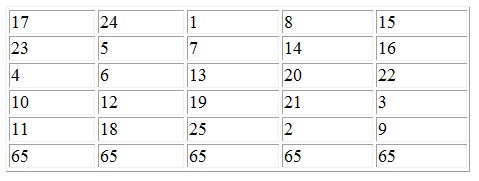
Magic Square (n is only odd number)

abcd

CODE

void CalculateOddMagicSquare()
{
  n=5;
  int matrix[5][5];

  int nsqr = n * n;
  int i=0, j=n/2;     // start position

  for (int k=1; k<=nsqr; ++k) 
  {
    matrix[i][j] = k;

    i--;
    j++;

    if (k%n == 0) 
    { 
      i += 2; 
      --j; 
    }
    else 
    {
      if (j==n) 
        j -= n;
      else if (i<0) 
        i += n;
    }
  }

Find count of numbers from 1 to n that don’t contain digit 3

int f(int n)
{
    int count = 0;
    int a;      // The current digit a_j
    int p = 1;  // The current value of 9^j

    while (n > 0) {
        a = n % 10;
        if (a == 3) {
            count = 0;
        }
        if (a <= 3) {
            count += a * p;
        } else {
            count += (a-1) * p;
        }
        n /= 10;
        p *= 9;
    }

    return count;
}

Simple Ajax program

<!DOCTYPE html>
<html>
<head>
<script>
function loadXMLDoc()
{
var xmlhttp;
if (window.XMLHttpRequest)
  {// code for IE7+, Firefox, Chrome, Opera, Safari
  xmlhttp=new XMLHttpRequest();
  }
else
  {// code for IE6, IE5
  xmlhttp=new ActiveXObject("Microsoft.XMLHTTP");
  }
xmlhttp.onreadystatechange=function()
  {
  if (xmlhttp.readyState==4 && xmlhttp.status==200)
    {
    document.getElementById("myDiv").innerHTML=xmlhttp.responseText;
    }
  }
xmlhttp.open("GET","ajax_info.txt",true);
xmlhttp.send();
}
</script>
</head>
<body>

<div id="myDiv"><h2>Let AJAX change this text</h2></div>
<button type="button" onclick="loadXMLDoc()">Change Content</button>

</body>
</html>

Square root of a number

double sqaure_root_of(double value)
{
     double lo = 1.0;
     double hi = value;

     while( hi - lo > 0.00001)
     {
          double mid = lo + (hi - lo) / 2 ;
          if( mid * mid - value > 0.00001)    
          {
              hi = mid;
          } 
          else {
              lo = mid;
          }
     }
     return lo;
 }

OR

float squareRoot(float n)
{
  float x = n;
  float y = 1;
  float e = 0.000001; /* e decides the accuracy level*/
  while(x - y > e)
  {
    x = (x + y)/2;
    y = n/x;
  }
  return x;
}

Merge two sorted list

Recursion

Node MergeLists(Node list1, Node list2) {
  if (list1 == null) return list2;
  if (list2 == null) return list1;

  if (list1.data < list2.data) {
    list1.next = MergeLists(list1.next, list2);
    return list1;
  } else {
    list2.next = MergeLists(list2.next, list1);
    return list2;
  }
}

Without Recursion

Node MergeLists(Node list1, Node list2) {
  if (list1 == null) return list2;
  if (list2 == null) return list1;

  Node head;
  if (list1.data < list2.data) {
    head = list1;
  } else {
    head = list2;
    list2 = list1;
    list1 = head;
  }
  while(list1.next != null && list2 != null) {
    if (list1.next.data <= list2.data) {
      list1 = list1.next;
    } else {
      Node tmp = list1.next;
      list1.next = list2;
      list2 = tmp;
    }
  } 
  if (list1.next == null) list1.next = list2;
  return head;
}

SDLC

Software development life cycle model phases:

  1. Requirement gathering and analysis
  2. Design
  3. Implementation or coding
  4. Testing
  5. Deployment
  6. Maintenance

SDLC models:

  • Waterfall Model
  • Iterative Model
  • Spiral Model
  • V-Model
  • Big Bang Model

Waterfall Model

First Process Model. Each phase must be completed before proceeding to the next phase without any overlapping in the phases.

Some situations where it is most appropriate:

  • Requirements are very well documented, clear and fixed
  • Technology not dynamic
  • Ample resources with required expertise available
  • Short project
  • does not allow for much reflection or revision.
  • No working software is produced until late during the life cycle.
  • Once an application is in the testing stage, it is very difficult to go back and change something

Disadvantage

  • does not allow for much reflection or revision.
  • No working software is produced until late during the life cycle.
  • Once an application is in the testing stage, it is very difficult to go back and change something

Iterative Model

Whole requirement is divided into various builds. During each iteration, the development module goes through the requirements, design, implementation and testing phases. Each subsequent release of the module adds function to the previous release.

Some situations where it is most appropriate:

  • Major requirements must be defined, some functionalities or requested enhancements may evolve with time.
  • A new technology is being used and is being learnt by the development team while working on the project.
  • Resources with needed skill set are not available and are planned to be used on contract basis for specific iterations.
  • There are some high risk features and goals which may change in the future.

Disadvantage

  • Applicable only to large and bulky software development projects.

Spiral model

Combination of iterative development process model and sequential linear development model i.e. waterfall model with very high emphasis on risk analysis.

The spiral model has four phases.

  • Identification
  • Design
  • Construct or Build
  • Evaluation and Risk Analysis

Uses of Spiral model:

  • budget constraint and risk evaluation
  • Long-term project commitment
  • Complex
  • Significant changes are expected in the product during the development cycle.

Disadvantage

Complex management as there is a risk of running the spiral in indefinite loop. Not suitable for small or low risk projects as its expensive.

V-Model

Extension of the waterfall model and is based on association of a testing phase for each corresponding development stage. There are Verification phases on one side and Validation phases on the other side with Coding phase in between.

Verification phases are:

  • Business Requirement Analysis
  • System Design
  • Architectural Design
  • Module Design

Validation phases in V-Model:

  • Unit Testing – Testing at code level and helps eliminate bugs at an early stage
  • Integration Testing – Testing the coexistence and communication of the internal modules within the system.
  • System Testing – Testing entire system functionality and the communication of the system under development with external systems. Most of the software and hardware compatibility issues are covered.
  • Acceptance Testing – Testing the product in user environment to check the non-functional issues such as load and performance defects.

Uses:

  • Requirements are well defined, clearly documented and fixed.
  • Product definition is stable and short.
  • Technology is not dynamic.

Disadvantage

Not a good model for long and complex and object-oriented projects. No working software is produced until late during the life cycle.

Big Bang Model

Focusing all the possible resources in software development and coding, with very little or no planning. Ideal for small projects

Advantages

  • Easy to manage
  • Very few resources required
  • Gives flexibility to developers
  • Good learning aid for new comers or students

Disadvantages

  • Very High risk and uncertainty.
  • Not a good model for long and complex and object-oriented projects.
  • Can turn out to be very expensive if requirements are misunderstood.

Agile Model

Breaks the product into small incremental builds which are provided in iterations. Each iteration lasts about 1-3 weeks and involves cross functional teams working simultaneously on various areas like planning, requirements analysis, design, coding, unit testing and acceptance testing.

Iterative approach is taken and working software build is delivered after each iteration. Each build is incremental in terms of features; the final build holds all the features required by the customer.

The most popular agile methods include Rational Unified Process (1994), Scrum (1995), Extreme Programming (1996), Adaptive Software Development and Dynamic Systems Development Method (DSDM) (1995).

  • Agile uses adaptive approach where there is no detailed planning and there is clarity on future tasks only in respect of what features need to be developed.
  • Team adapts to the changing product requirements dynamically.
  • The product is tested very frequently, through the release iterations, minimizing the risk of any major failures in future.
  • Customer interaction is the backbone of Agile methodology, and open communication with minimum documentation are the typical features of Agile development environment.
  • The agile teams work in close collaboration with each other and are most often located in the same geographical location.

Disadvantages

  • Not suitable for handling complex dependencies.
  • An agile leader and agile PM practice is a must.
  • Depends heavily on customer interaction.
  • High individual dependency and transfer of technology to new team members quite challenging, since there is minimum documentation generated.

Different types of software prototypes:

  • Throwaway/Rapid Prototyping
  • Evolutionary Prototyping
  • Incremental Prototyping
  • Extreme Prototyping

Theory – IV

Container class

Stores a collection of other objects and provide sequential or direct access to them. The string class is a container that holds chars. All container classes access the contained elements safely and efficiently by using iterators. Container class is a class that hold group of same or mixed objects in memory.

Containers of pointers provide containers to hold the objects that are heap-allocated in manner that is exception-safe and with minimum overhead.

Types

  • Sequence containers: array, vector, list
  • Container adaptors: stack, queue, priority_queue
  • Associative containers: set, map

Functions that:

  • Create an empty container (via a constructor)
  • Insert a new object into the container
  • Remove an object from the container
  • Report the number of objects currently in the container
  • Empty the container of all objects
  • Provide access to the stored objects
  • Sort the elements (optional)

Example:

Creating containers:  vector<int> numbers(7);
Extending a container:  vector<int> v; // creates an empty vector
                        v.push_back(3);
                        v.push_back(8);

Accessing elements of a container:   v[1]=3;
                                     v[2]=5;
                                     v[3]=v[1]+v[2];


find - looks for a value
vector<int>::iterator it;
  ...
  it = find (v.begin(), v.end(), 30);
  if (it ==  v.end())
    cout << "30 not found " << endl;
  else
    cout << "30 is in v " << endl;

count
vector<int> v;
cout << "30 is in v "  << count(v.begin(), v.end(), 30) << " times" << endl;

for_each
    void square(int n) {
       cout << n*n << endl;
    }

    vector<int> v;

    // print the square of all the values in v 
    for_each(v.begin(), v.end(), square);

transform
    int square(int n) {
       return  n*n;
    }

    vector<int> v;

    // replace each value in v by its square
    transform(v.begin(), v.end(), square);

Replace
replace(v.begin(), v.end(), 7,3);

fill 
    fill(v,9); 

copy
 vector<int> v(10);
for (int i=0;i<v.size();i++)
  v[i]=i;
list<int> l(10);
copy(v.begin(), v.end(),l.begin());

remove
it=remove (v.begin(), v.end(), 7);

min_element
it=min_element(v.begin(), v.end());

Adapter class

Provides an empty implementation of all methods in an event listener interface i.e this class itself write definition for methods which are present in particular event listener interface. However these definitions does not affect program flow or meaning at all.

useful when you want to receive and process only some of the events that are handled by a particular event listener interface.

Suppose you want to use MouseClicked Event or method from MouseListener, if you do not use adapter class then unnecessarily you have to define all other methods from MouseListener such as MouseReleased, MousePressed etc.

But If you use adapter class then you can only define  MouseClicked method and don’t worry about other method definition because class provides an empty implementation of all methods in an event listener interface.

xyz

Example:

import java.awt.*;
import java.awt.event.*;
import java.applet.*;

/*
<applet code="MainClass" height="800" width = "500">
</applet>
*/

public class MainClass extends Applet 
{
     public void init()                   
     {
           addMouseListener(new AdapterTest(this));
      }
}   

// AdapterTest Created
class AdapterTest extends MouseAdapter  
{
       MainClass MainClassObj;  
       public AdapterTest(MainClass MainClassObj) 
       {
              this.MainClassObj=MainClassObj;           
        } 

        public void mouseClicked(MouseEvent me)
        {
                 MainClassObj.showStatus("Mouse Has Been Clicked ");
         }
}

Memory space for a program has two parts:

  • Data segment

A data segment is a portion of virtual address space of a program, which contains the global variables and static variables that are initialized by the programmer. The size of this segment is determined by the values placed there by the programmer before the program was compiled or assembled, and does not change at run-time. The data segment is read-write, since the values of the variables can be altered at run-time.

Example – Stack, Heap, uninitialized and initialized data

  • Code segment or Text segment

It is one of the sections of a program in an object file or in memory, which contains executable instructions. It has a fixed size and is usually read-only. If the text section is not read-only, then the particular architecture allows self-modifying code.

Example – main()

xyz

Finalize method

Before an object is garbage collected, the runtime system calls its finalize() method. The intent is for finalize() to release system resources such as open files or open sockets before object gets collected.

By using finalization, you can define specific actions that will occur when an object is just about to be reclaimed by the garbage collector. It is not called when an object goes out-of-scope.

To add a finalizer to a class, you simply define the finalize() method. The java run time calls that method whenever it is about to recycle an object of that class. Inside the finalize() method you will specify those actions that must be performed before an object is destroyed.

protected void finalize()   // protected is used to prevent access by code defined outside its class.
{
     // finalization code here
}