conn = ConnectionPool.getConnection();
connection = getClientConnection();

public static Connection getClientConnection() throws SQLException
    {
        Connection conn = null;
        try
        {
            if(!propertiesRead)
            {
                propertiesRead = true;
                Properties props = new Properties();
                props.load(new FileInputStream(new File("ClientDBConnection.properties")));
                DB_URL = props.getProperty("DB_URL");
                DB_USER = props.getProperty("DB_USER");
                DB_PASSWORD = props.getProperty("DB_PASSWORD");
            }

            Class.forName("oracle.jdbc.driver.OracleDriver");
            conn = DriverManager.getConnection(DB_URL,DB_USER,DB_PASSWORD);
        }
        catch(Exception ex)
        {
            throw new SQLException("Unable to create Client Connection "+ex);
        }
        return conn;

query = new StringBuilder();
query.append(" SELECT JOINEESCOUNT FROM USERS  ");

//any conditions
if("YTD".equals(bean.getTypeOfReport())){
        query.append(" '01-Jul-"+bean.getFiscalYear()+"' AND SYSDATE ");
}

pstmt = conn.prepareStatement(query.toString());
pstmt.setInt(1,bean.getId());
rs = pstmt.executeQuery();
while(rs.next()){
      newBean.setNumOfJoinees(rs.getInt("JOINEESCOUNT"));
}
Author Archives: anirban0328
Josephus problem
There are n people standing in a circle waiting to be executed. The counting out begins at some point in the circle and proceeds around the circle in a fixed direction. In each step, a certain number of people are skipped and the next person is executed. The elimination proceeds around the circle (which is becoming smaller and smaller as the executed people are removed), until only the last person remains, who is given freedom. Given the total number of persons n and a number k which indicates that k-1 persons are skipped and kth person is killed in circle. The task is to choose the place in the initial circle so that you are the last one remaining and so survive.
CODE
int josephus(int n, int k)
{
  if (n == 1)
    return 1;
  else
    /* The position returned by josephus(n - 1, k) is adjusted because the
       recursive call josephus(n - 1, k) considers the original position
       k%n + 1 as position 1 */
    return (josephus(n - 1, k) + k-1) % n + 1;
}
Why String is Immutable or Final in Java
- It is mainly for security reasons. String is used as parameter in network connection, database url etc. It can be easily attacked if it is mutable
- Immutability of String solves some synchronization issues, it makes the String thread safe
- To support StringPool facility. Design Strings are created in a special memory area in java heap known as “String Intern pool”. When ever you create new string variable it search for the pool to check wether it is already exist. It exist then return reference of the existing string object. If string is not immutable, changing the string with one reference will lead to the wrong value for the other references.
- To cache the hashcode of String
- To support class loading mechanism in which String is used as arguments. String being mutable results in wrong class being loaded
- when compiler optimizes your String objects, it sees that if two objects have same value (a=”test”, and b=”test”) and thus you need only one string object
HashMap
Mechanism
mechanism in HashMap to store this key value pair. HashMap has an inner class Entry
static class Entry<K ,V> implements Map.Entry<K ,V>
{
final K key;
V value;
Entry<K ,V> next;
final int hash;
…//More code goes here
}
What put() method actually does
1) First of all, key object is checked for null. If key is null, value is stored in table[0] position. Because hash code for null is always 0.
2) Then on next step, a hash value is calculated using key’s hash code by calling its hashCode() method. JDK designers well assumed that there might be some poorly written hashCode() functions that can return very high or low hash code value. To solve this issue, they introduced another hash() function, and passed the object’s hash code to this hash() function to bring hash value in range of array index size.
3) Now indexFor(hash, table.length) function is called to calculate exact index position for storing the Entry object.
4) Entry objects are stored in LinkedList form. HashMap checks whether there is already an entry?? If there is no entry already present, Entry object is stored in this location.
5) If there is already an object sitting on calculated index, its next attribute is checked. If it is null, and current Entry object becomes next node in LinkedList. If next variable is not null, procedure is followed until next is evaluated as null.
What if we add the another value object with same key as entered before. Logically, it should replace the old value. How it is done? Well, after determining the index position of Entry object, while iterating over LinkedList on calculated index, HashMap calls equals method on key object for each Entry object. All these Entry objects in LinkedList will have similar hash code but equals() method will test for true equality. If key.equals(k) will be true then both keys are treated as same key object. This will cause the replacing of value object inside Entry object only.
In this way, HashMap ensure the uniqueness of keys.
How get() methods works internally
Answer we already should know that the way key uniqueness is determined in put() method , same logic is applied in get() method also. The moment HashMap identify exact match for the key object passed as argument, it simply returns the value object stored in current Entry object.
If no match is found, get() method returns null.
Above code is same as put() method till if (e.hash == hash && ((k = e.key) == key || key.equals(k))), after this simply value object is returned.
Key Notes
1. Data structure to store Entry objects is an array named table of type Entry.
2. A particular index location in array is referred as bucket, because it can hold the first element of a LinkedList of Entry objects.
3. Key object’s hashCode() is required to calculate the index location of Entry object.
4. Key object’s equals() method is used to maintain uniqueness of Keys in map.
5. Value object’s hashCode() and equals() method are not used in HashMap’s get() and put() methods.
6. Hash code for null keys is always zero, and such Entry object is always stored in zero index in Entry[].
How will you measure the performance of HashMap?
An instance of HashMap has two parameters that affect its performance: initial capacity and load factor.
The capacity is the number of buckets in the hash table( HashMap class is roughly equivalent to Hashtable, except that it is unsynchronized and permits nulls.), and the initial capacity is simply the capacity at the time the hash table is created.
The load factor is a measure of how full the hash table is allowed to get before its capacity is automatically increased. When the number of entries in the hash table exceeds the product of the load factor and the current capacity, the hash table is rehashed (that is, internal data structures are rebuilt) so that the hash table has approximately twice the number of buckets.
In HashMap class, the default value of load factor is (.75) .
Rotate array matrix by 90deg
void rotateMatrix(int a[][]) {
    int n = a.length;
    if (n <= 1) {
        return; // nothing to do
    }

    /* layers */
    for (int i = 0; i < n / 2; i++) {
        /* elements */
        for (int j = i; j < n - i - 1; j++) {
            int saved = a[i][j];
            a[i][j] = a[n - j - 1][i];
            a[n - j - 1][i] = a[n - 1 - i][n - 1 - j];
            a[n - 1 - i][n - 1 - j] = a[j][n - 1 - i];
            a[j][n - 1 - i] = saved;
        }
    }
}
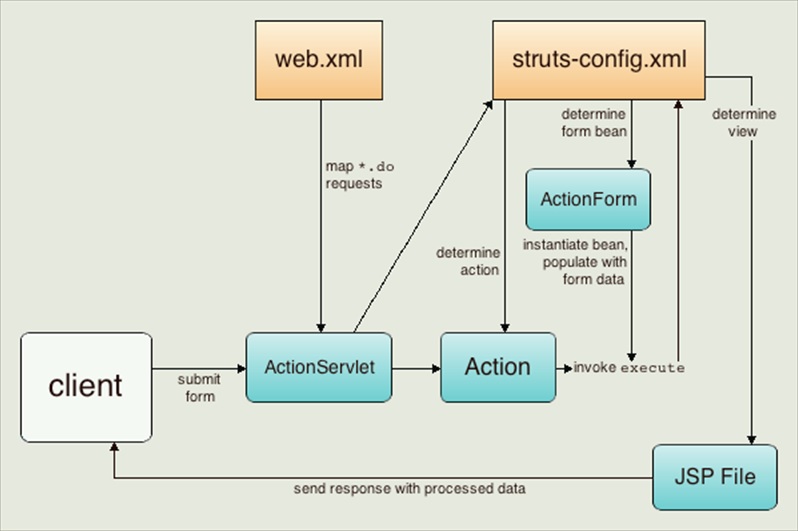
Struts
Find word in a file
br = new BufferedReader(new FileReader(filePath));
        try {
            while((line = br.readLine()) != null)
            {
                String[] words = line.split(" ");

                for (String word : words) {
                  if (word.equals(inputSearch)) {
                    count++;
                  }
              }
          }
      }

OR

br = new BufferedReader(new FileReader(filePath));
        try {
            while((line = br.readLine()) != null)
            {
                  if (line.contains(inputSearch)) {
                    count++;
                  }
             }
         }
    }
HashCode() and equals()
hashCode() method is used to get a unique integer for given object. This integer is used for determining the bucket location, when this object needs to be stored in some HashTable like data structure. By default, Object’s hashCode() method returns and integer representation of memory address where object is stored.
equals() method, as name suggest, is used to simply verify the equality of two objects. Default implementation simply check the object references of two objects to verify their equality.
- Always use same attributes of an object to generate hashCode() and equals() both. As in our case, we have used employee id.
- equals() must be consistent (if the objects are not modified, then it must keep returning the same value).
- Whenever a.equals(b), then a.hashCode() must be same as b.hashCode().
- If two objects have the same hashcode, they may or may not be equal.
- If you override one, then you should override the other.
The “==” operator
In Java, when the “==” operator is used to compare 2 objects, it checks to see if the objects refer to the same place in memory. In other words, it checks to see if the 2 object names are basically references to the same memory location. A very simple example will help clarify this:
String obj1 = new String("xyz");
String obj2 = new String("xyz");

obj1==obj2 is FALSE

String obj1 = new String("xyz");
// now obj2 and obj1 reference the same place in memory
String obj2 = obj1;

obj1==obj2 is TRUE
The equals() method
equals method is actually meant to compare the contents of 2 objects, and not their location in memory.
String obj1 = new String("xyz");
String obj2 = new String("xyz");

obj1.equals(obj2) is TRUE
by default equals() will behave the same as the “==” operator and compare object locations. But, when overriding the equals() method, you should compare the values of the object instead.
The Java String class actually overrides the default equals() implementation in the Object class – and it overrides the method so that it checks only the values of the strings, not their locations in memory. This means that if you call the equals() method to compare 2 String objects, then as long as the actual sequence of characters is equal, both objects are considered equal.
Autoboxing
Autoboxing and unboxing is introduced in Java 1.5 to automatically convert primitive type into boxed primitive( Object or Wrapper class). autoboxing allows you to use primitive and object type interchangeably in Java on many places like assignment, method invocation etc.
ArrayList<Integer> intList = new ArrayList<Integer>();
intList.add(1); //autoboxing – primitive to object
intList.add(2); //autoboxing
Segregate even and odd nodes in a Linked List
struct node *reverse(struct node **head)
{
    struct node *curr=*head;
    struct node *prev=NULL;
    truct node *next;
    while(curr!=NULL)
    {
        next=curr->next;
        curr->next=prev;
        prev=curr;
        curr=next;
    }
    return prev;
}

struct node *segregateEvenOdd(struct node **head_ref)
{
    struct node *curr = *head_ref;
    struct node *even=NULL,*odd=NULL,*evenh,*oddh;

    while(curr!=NULL)
    {
        if(curr->data%2==0)
        {
            push(&even,curr->data);
        }
        else
        {
            push(&odd,curr->data);
        }
        curr=curr->next;
    }
    evenh=reverse(&even);
    struct node *temp=evenh;
    oddh=reverse(&odd);

    while(temp->next!=NULL)
    {
        temp=temp->next;
    }
    temp->next=oddh;

    return evenh;
}
 Learn By Coding