int count = 0;
String str = "Abcdefg";

if (str.length() > 0) {
    Pattern vowelPattern = Pattern.compile("[a/Ae/Ei/Io/Ou/U]");
    Matcher vowelMatcher = vowelPattern.matcher(str);

     while (vowelMatcher.find())
        count++;
     }
Monthly Archives: March 2015
Add numbers from a string
String str = "12 hi when 8 and 9";
str=str.replaceAll("[\\D]+"," "); // returns 12 8 9

String[] numbers=str.split(" ");
    int sum = 0;
    for(int i=0;i<numbers.length;i++){
            sum+=Integer.parseInt(numbers[i]);
        }
\\d* matches 0 or more digits, and so it even matches an empty string.
Use \\d+ to match only 1 and more digits
Greedy quantifiers
X? X, once or not at all
X* X, zero or more times
X+ X, one or more times
Egg Drop
Assume that we have m eggs, and n drops are allowed. Let us represent the height of the tallest building by g (m, n), for which we can find a solution with these constraints.
g (m, n) = g(m – 1, n – 1) + g (m, n – 1) (n > 0)
g (m, 0) = 1.
This is because if we drop the first egg from the g(m – 1, n – 1)-th step, if it breaks, we still have
(m – 1) eggs and (n – 1) steps, which are enough to detect in a building of height up to g (m – 1, n – 1).
On the other hand, if it does not break, we have m eggs and (n – 1) steps, which can give us extra
g (m, n – 1) height to be able to detect.
For fixed n, the expression of g(m, n) can be calculated explicitly., e.g..
g (2, n) = n * (n + 1)/2, (n >= 3 )
Explanation
n + (n-1) + (n-2) + (n-3) + (n-4) + … + 1 >= 100
n (n+1) / 2 >= 100
3 Eggs
h(3,m) = (m-1)m/2 +1 + (m-2)(m-1)/2+1 + … = SUM (1/2)j^2 – (1/2)j +1 for j from 1 to m and
we get (1/12)m(m+1)(2m+1) – (1/4)m(m+1) + m = (1/6)(m^3 -m) + m = (1/6)(m-1)m(m+1) + m.
(1/6)(m-1)m(m+1) + m < 100 which gives m =9
So 9 is enough.
CODE
When we drop an egg from a floor x, there can be two cases (1) The egg breaks (2) The egg doesn’t break.
1) If the egg breaks after dropping from xth floor, then we only need to check for floors lower than x with remaining eggs; so the problem reduces to x-1 floors and n-1 eggs
2) If the egg doesn’t break after dropping from the xth floor, then we only need to check for floors higher than x; so the problem reduces to k-x floors and n eggs.
/* Function to get minimum number of trails needed in worst
  case with n eggs and k floors */
int eggDrop(int n, int k)
{
    // If there are no floors, then no trials needed. OR if there is
    // one floor, one trial needed.
    if (k == 1 || k == 0)
        return k;

    // We need k trials for one egg and k floors
    if (n == 1)
        return k;

    int min = INT_MAX, x, res;

    // Consider all droppings from 1st floor to kth floor and
    // return the minimum of these values plus 1.
    for (x = 1; x <= k; x++)
    {
        res = max(eggDrop(n-1, x-1), eggDrop(n, k-x));
        if (res < min)
            min = res;
    }

    return min + 1;
}
break vs return
break is used to exit (escape) the for-loop, while-loop, switch-statement that you are currently executing.
return will exit the entire method you are currently executing (and possibly return a value to the caller, optional).
you cannot use either break nor return to escape an if-else-statement. They are used to escape other scopes.
The value of x inside the while-loop will determine if the code below the loop will be executed or not:
void f()
{
   int x = -1;
   while(true)
   {
     if(x == 0)
        break;         // escape while() and jump to execute code after the the loop
     else if(x == 1)
        return;        // will end the function f() immediately,
                       // no further code inside this method will be executed.

     do stuff and eventually set variable x to either 0 or 1
     ...
   }

   code that will be executed on break (but not with return).
   ....
}
break leaves a loop, continue jumps to the next iteration.
    class BreakContinue {
        public static void main( String [] args ) {
               for( int i = 0 ; i < 10 ; i++ ) {
                     if( i % 2 == 0) { // if pair, will jump
                         continue; // don't go to "System.out.print" below.
                     }
                     System.out.println("The number is " + i );

                     if( i == 7 ) {
                         break; // will end the execution, 8,9 wont be processed
                      }
               }
        }
    }
Ans
The number is 1
The number is 3
The number is 5
The number is 7
Struts MVC Architecture
The model contains the business logic and interact with the persistance storage to store, retrive and manipulate data.
The view is responsible for dispalying the results back to the user. In Struts the view layer is implemented using JSP.
The controller handles all the request from the user and selects the appropriate view to return. In Sruts the controller’s job is done by the ActionServlet.
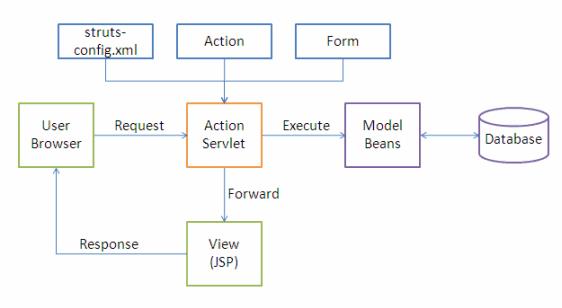
The following events happen when the Client browser issues an HTTP request.
- The ActionServlet receives the request.
- The struts-config.xml file contains the details regarding the Actions, ActionForms, ActionMappings and ActionForwards.
- During the startup the ActionServelet reads the struts-config.xml file and creates a database of configuration objects. Later while processing the request the ActionServlet makes decision by refering to this object.
When the ActionServlet receives the request it does the following tasks.
- Bundles all the request values into a JavaBean class which extends Struts ActionForm class.
- Decides which action class to invoke to process the request.
- Validate the data entered by the user.
- The action class process the request with the help of the model component. The model interacts with the database and process the request.
- After completing the request processing the Action class returns an ActionForward to the controller.
- Based on the ActionForward the controller will invoke the appropriate view.
- The HTTP response is rendered back to the user by the view component.
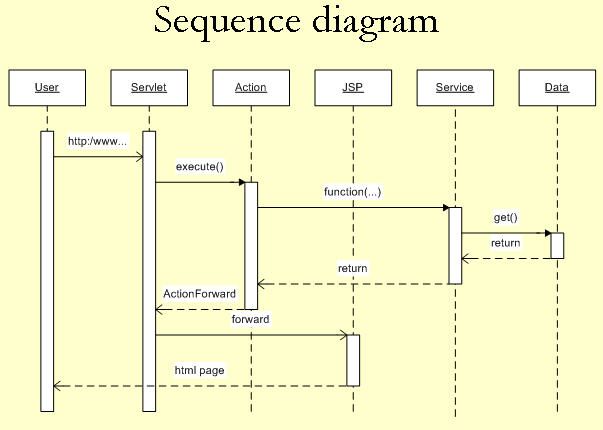
- User clicks on a link in an HTML page.
- Servlet controller receives the request, looks up mapping information in struts-config.xml, and routes to an action.
- Action makes a call to a Model layer service.
- Service makes a call to the Data layer (database) and the requested data is returned.
- Service returns to the action.
- Action forwards to a View resource (JSP page)
- Servlet looks up the mapping for the requested resource and forwards to the appropriate JSP page.
- JSP file is invoked and sent to the browser as HTML.
- User is presented with a new HTML page in a web browser.
web.xml Servlet Configuration
<?xml version="1.0" encoding="ISO-8859-1"?>

<!DOCTYPE web-app
    PUBLIC "-//Sun Microsystems, Inc.//DTD Web Application 2.3//EN"
    "http://java.sun.com/dtd/web-app_2_3.dtd">

<web-app>

    <servlet>
<servlet-name>action</servlet-name>
<servlet-class>org.apache.struts.action.ActionServlet</servlet-class>
</servlet>

<servlet-mapping>
<servlet-name>action</servlet-name>
<url-pattern>*.do</url-pattern>
</servlet-mapping>
</web-app>
Struts-config.xml
<struts-config>

<form-beans>
<form-bean name="HelloWorldActionForm"

type="com.vaannila.HelloWorldActionForm"/>

<action-mappings>
<action input="/index.jsp" name="HelloWorldActionForm" path="/HelloWorld"  scope="session" type="com.vaannila.HelloWorldAction">
<forward name="success" path="/helloWorld.jsp" />
</action>
</action-mappings>
Struts-config.xml is used for making connection between view & controller whereas web.xml is used for making connection between web container & web application.
web.xml will be read by container when we start the container.struts-config.xml will be read by init() method of ActionServlet.
JDBC
connection conn = connectionpool.getconnection();
          // drivermanager.getconenction(url,username, pass) get from property file

preparedstatement pstmt;
resultset rs;

StringBuilder query = new String Builder();
query.append ("SELECT * FROM USERS");

pstmt = conn.preparedstatement(query.toString());
pstmt.set(1, bean.getvalue())'

rs = pstmt.executeQuery();

while(rs.next()){
    rs.getInt("");
}
Factory method
Static factory method
The static factory method is NOT the same as the Factory Method pattern
Factory Method: “Define an interface for creating an object, but let the classes which implement the interface decide which class to instantiate. The Factory method lets a class defer instantiation to subclasses”.
Static factory method is simply a static method that returns an instance of a class.
The difference:
The key idea of static factory method is to gain control over object creation and delegate it from constructor to static method. The decision of object to be created is like in Abstract Factory made outside the method (in common case, but not always). While the key (!) idea of Factory Method is to delegate decision of what instance of class to create inside Factory Method. E.g. classic Singleton implementation is a special case of static factory method. Example of commonly used static factory methods:
- valueOf
- getInstance
- newInstance
Best Example of Factory method design pattern is valueOf() method.
Singleton design pattern
With the Singleton design pattern you can:
- Ensure that only one instance of a class is created
- Provide a global point of access to the object
- Allow multiple instances in the future without affecting a singleton class’s clients
- The Singleton’s purpose is to control object creation, limiting the number of obejcts to one only. Since there is only one Singleton instance, any instance fields of a Singleton will occur only once per class, just like static fields. Singletons often control access to resources such as database connections or sockets.
- For example, if you have a license for only one connection for your database or your JDBC driver has trouble with multithreading, the Singleton makes sure that only one connection is made or that only one thread can access the connection at a time.
// File Name: Singleton.java
public class Singleton {

   private static Singleton singleton = new Singleton( );

   /* A private Constructor prevents any other
    * class from instantiating.
    */
   private Singleton(){ }

   /* Static 'instance' method */
   public static Singleton getInstance( ) {
      return singleton;
   }
   /* Other methods protected by singleton-ness */
   protected static void demoMethod( ) {
      System.out.println("demoMethod for singleton");
   }
}
// File Name: SingletonDemo.java
public class SingletonDemo {
   public static void main(String[] args) {
      Singleton tmp = Singleton.getInstance( );
      tmp.demoMethod( );
   }
}
Factory Method Pattern
- creates objects without exposing the instantiation logic to the client.
- refers to the newly created object through a common interface
Factory methods:
- have names, unlike constructors, which can clarify code.
- do not need to create a new object upon each invocation – objects can be cached and reused, if necessary.
- can return a subtype of their return type – in particular, can return an object whose implementation class is unknown to the caller. This is a very valuable and widely used feature in many frameworks which use interfaces as the return type of static factory methods.
Common names for factory methods include getInstance and valueOf.
Regex
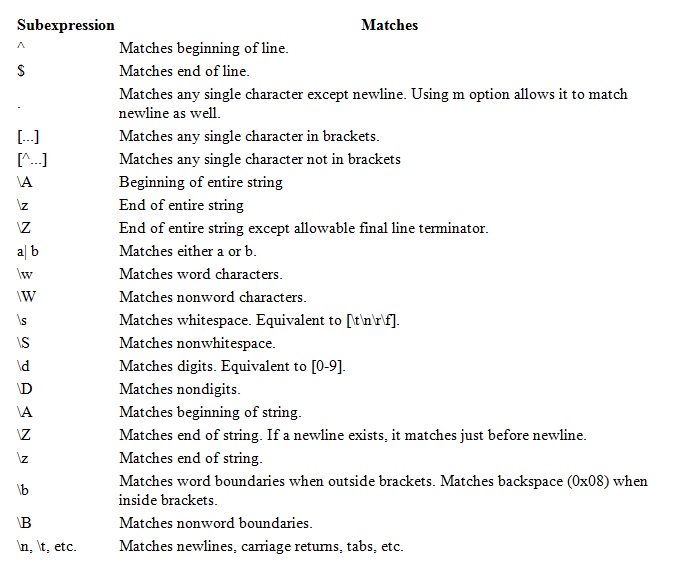
CODE SNIPET
String regex “\s”;
String input = "Testing the text for regex";
String replace = ”Text to be replaced”;

Pattern pattern = Pattern.compile(regex);
Matcher matcher = pattern.matcher(input);

if(matcher.find()){
   ...
}
Other Functions
Matcher.matches() – returns true or false
Input = m.replaceAll(replace);
CODE
import java.util.regex.Matcher;
import java.util.regex.Pattern;

public class RegexTestPatternMatcher {
  public static final String EXAMPLE_TEST = "This is my small example string which I'm going to use for pattern matching.";

  public static void main(String[] args) {
    Pattern pattern = Pattern.compile("\\w+");
    Matcher matcher = pattern.matcher(EXAMPLE_TEST);
    // check all occurance
    while (matcher.find()) {
      System.out.print("Start index: " + matcher.start());
      System.out.print(" End index: " + matcher.end() + " ");
    }
  }
}
OR
import java.util.regex.Matcher;
import java.util.regex.Pattern;

public class RegexMatches
{
    public static void main( String args[] ){

      // String to be scanned to find the pattern.
      String line = "This order was placed for QT3000! OK?";
      String pattern = "(.*)(\\d+)(.*)";

      // Create a Pattern object
      Pattern r = Pattern.compile(pattern);

      // Now create matcher object.
      Matcher m = r.matcher(line);
      if (m.find( )) {
         System.out.println("Found value: " + m.group(0) );
         System.out.println("Found value: " + m.group(1) );
         System.out.println("Found value: " + m.group(2) );
      } else {
         System.out.println("NO MATCH");
      }
   }
}
Java Concepts – 2
Difference between an Interface and an Abstract class
- All methods in an interface are implicitly abstract. On the other hand, an abstract class may contain both abstract and non-abstract methods.
- A class may implement a number of Interfaces, but can extend only one abstract class.
- In order for a class to implement an interface, it must implement all its declared methods. However, a class may not implement all declared methods of an abstract class. Though, in this case, the sub-class must also be declared as abstract.
- Abstract classes can implement interfaces without even providing the implementation of interface methods.
- Variables declared in a Java interface is by default final. An abstract class may contain non-final variables.
- Members of a Java interface are public by default. A member of an abstract class can either be private, protected or public.
- An interface is absolutely abstract and cannot be instantiated. An abstract class also cannot be instantiated, but can be invoked if it contains a main method.
How do you ensure that N threads can access N resources without deadlock ?
- A very simple way to avoid deadlock while using N threads is to impose an ordering on the locks and force each thread to follow that ordering. Thus, if all threads lock and unlock the threads in the same order, no deadlocks can arise.
Differences exist between Iterator and ListIterator
- An Iterator can be used to traverse the Set and List collections, while the ListIterator can be used to iterate only over Lists.
- The Iterator can traverse a collection only in forward direction, while the ListIterator can traverse a List in both directions.
- The ListIterator implements the Iterator interface and contains extra functionality, such as adding an element, replacing an element, getting the index position for previous and next elements, etc.
Differences exist between HashMap and Hashtable
- A HashMap allows the existence of null keys and values, while a Hashtable doesn’t allow neither null keys, nor null values.
- A Hashtable is synchronized, while a HashMap is not. Thus, HashMap is preferred in single-threaded environments, while aHashtable is suitable for multi-threaded environments.
- A HashMap provides its set of keys and a Java application can iterate over them. Thus, a HashMap is fail-fast. On the other hand, a Hashtable provides an Enumeration of its keys.
Difference between ArrayList and LinkedList
- An ArrayList is an index based data structure backed by an Array. It provides random access to its elements with a performance equal to O(1). On the other hand, a LinkedList stores its data as list of elements and every element is linked to its previous and next element. In this case, the search operation for an element has execution time equal to O(n).
- The Insertion, addition and removal operations of an element are faster in a LinkedList compared to an ArrayList, because there is no need of resizing an array or updating the index when an element is added in some arbitrary position inside the collection.
- A LinkedList consumes more memory than an ArrayList, because every node in a LinkedList stores two references, one for its previous element and one for its next element.
HASHSET
HashSet does not guarantee any insertion orders of the set but it allows null elements. HashSet can be used in place of ArrayList to store the object if you require no duplicate and don’t care about insertion order.
Method Overloading Rules
- change method signature. Method signature is made of number of arguments, type of arguments and order of arguments
- only changing the return type of method does not amount to method overloading.
- So your overloaded method throws the same exception, a different exception or it simply does no throw any exception; no effect at all on method loading.
Method Overriding Rules
- argument list in overridden and overriding methods must be exactly same
- return type of overriding method can be child class of return type declared in overridden method.
public class SuperClass {
   //Overriden method
   public Number sum(Integer a, Integer b) {
       return a + b;
   }
}

class SubClass extends SuperClass {
   //Overriding method
   @Override
   public Integer sum(Integer a, Integer b) {
                   //Integer extends Number; so it's valid
       return a + b;
   }
}
private, static and final methods can not be overridden
Overriding method can not throw checked Exception higher in hierarchy than thrown by overridden method. Let’s say for example overridden method in parent class throws FileNotFoundException, the overriding method in child class can throw FileNotFoundException; but it is not allowed to throw IOException or Exception, because IOException or Exception are higher in hierarchy i.e. super classes of FileNotFoundException.
Java Concepts
THROWS VS THROW
1. Throws clause in used to declare an exception and throw keyword is used to throw an exception explicitly.
2. If we see syntax wise, throw is followed by an instance variable and throws is followed by exception class names.
3. The keyword throw is used inside method body to invoke an exception and throws clause is used in method declaration (signature).
Throw:

static{
try {
throw new Exception("Something went wrong!!");
} catch (Exception exp) {
System.out.println("Error: "+exp.getMessage());
}
}

Throws:
public void sample() throws ArithmeticException{
 //Statements

.....

 //if (Condition : There is an error)
ArithmeticException exp = new ArithmeticException();
 throw exp;
...
}
Cloning
By default, java cloning is ‘field by field copy’ i.e. as the Object class does not have idea about the structure of class on which clone() method will be invoked. So, JVM when called for cloning, do following things:
1) If the class has only primitive data type members then a completely new copy of the object will be created and the reference to the new object copy will be returned.
2) If the class contains members of any class type then only the object references to those members are copied and hence the member references in both the original object as well as the cloned object refer to the same object.
In java, if a class needs to support cloning it has to do following things:
A) You must implement Cloneable
B) You must override clone() method from Object class.
EXAMPLE
Employee cloned = (Employee) original.clone();
System.out.println(cloned.getEmpoyeeId());
Finally
Finally block will execute even if you put return statement in try block or catch block but finally block won’t run if you call System.exit form try or catch.
Static
non-static variable cannot be referenced from a static context. Static variable belongs to Java class while non-static variable belongs to object. Static variable will keep same value for every object while value of non static variable varies from object to object.
Static fields are initialized at the time of class loading in Java, opposite to instance variable which is initialised when you create instance of a particular class.Static method can not be overridden in Java as they belong to class and not to object. If you try to override a static method with a non-static method in sub class you will get compilation error.
How to access non static variable inside static method or block
public class StaticTest {
    private int count=0;
    public static void main(String args[]) throws IOException {
        StaticTest test = new StaticTest(); //accessing static variable by creating an instance of class
        test.count++;
    }
}
Yes, we can overload static method in Java.
Given two words (start and end), and a dictionary, find the length of shortest transformation sequence from start to end
Given:
start = "hit"
end = "cog"
dict = ["hot","dot","dog","lot","log"]
As one shortest transformation is “hit” -> “hot” -> “dot” -> “dog” -> “cog”, the program should return its length 5.
Note:
Return 0 if there is no such transformation sequence.
All words have the same length.
All words contain only lowercase alphabetic characters.
CODE
public int ladderLength(String start, String end, HashSet<String> dict) {
    if (dict.size() == 0)
        return 0;

    dict.add(end);

    LinkedList<String> wordQueue = new LinkedList<String>();
    LinkedList<Integer> distanceQueue = new LinkedList<Integer>();

    wordQueue.add(start);
    distanceQueue.add(1);

    //track the shortest path
    int result = Integer.MAX_VALUE;
    while (!wordQueue.isEmpty()) {
        String currWord = wordQueue.pop();
        Integer currDistance = distanceQueue.pop();

        if (currWord.equals(end)) {
            result = Math.min(result, currDistance);
        }

        for (int i = 0; i < currWord.length(); i++) {
            char[] currCharArr = currWord.toCharArray();
            for (char c = 'a'; c <= 'z'; c++) {
                currCharArr[i] = c;

                String newWord = new String(currCharArr);
                if (dict.contains(newWord)) {
                    wordQueue.add(newWord);
                    distanceQueue.add(currDistance + 1);
                    dict.remove(newWord);
                }
            }
        }
    }

    if (result < Integer.MAX_VALUE)
        return result;
    else
        return 0;
}
 Learn By Coding