The model contains the business logic and interact with the persistance storage to store, retrive and manipulate data.
The view is responsible for dispalying the results back to the user. In Struts the view layer is implemented using JSP.
The controller handles all the request from the user and selects the appropriate view to return. In Sruts the controller’s job is done by the ActionServlet.
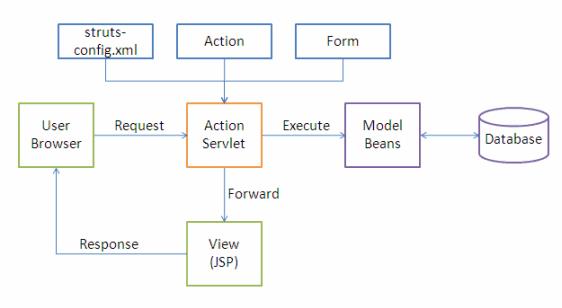
The following events happen when the Client browser issues an HTTP request.
- The ActionServlet receives the request.
- The struts-config.xml file contains the details regarding the Actions, ActionForms, ActionMappings and ActionForwards.
- During the startup the ActionServelet reads the struts-config.xml file and creates a database of configuration objects. Later while processing the request the ActionServlet makes decision by refering to this object.
When the ActionServlet receives the request it does the following tasks.
- Bundles all the request values into a JavaBean class which extends Struts ActionForm class.
- Decides which action class to invoke to process the request.
- Validate the data entered by the user.
- The action class process the request with the help of the model component. The model interacts with the database and process the request.
- After completing the request processing the Action class returns an ActionForward to the controller.
- Based on the ActionForward the controller will invoke the appropriate view.
- The HTTP response is rendered back to the user by the view component.
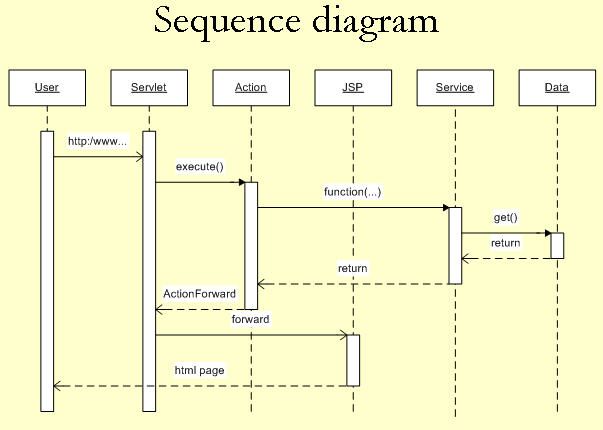
- User clicks on a link in an HTML page.
- Servlet controller receives the request, looks up mapping information in struts-config.xml, and routes to an action.
- Action makes a call to a Model layer service.
- Service makes a call to the Data layer (database) and the requested data is returned.
- Service returns to the action.
- Action forwards to a View resource (JSP page)
- Servlet looks up the mapping for the requested resource and forwards to the appropriate JSP page.
- JSP file is invoked and sent to the browser as HTML.
- User is presented with a new HTML page in a web browser.
web.xml Servlet Configuration
<?xml version="1.0" encoding="ISO-8859-1"?>

<!DOCTYPE web-app
    PUBLIC "-//Sun Microsystems, Inc.//DTD Web Application 2.3//EN"
    "http://java.sun.com/dtd/web-app_2_3.dtd">

<web-app>

    <servlet>
<servlet-name>action</servlet-name>
<servlet-class>org.apache.struts.action.ActionServlet</servlet-class>
</servlet>

<servlet-mapping>
<servlet-name>action</servlet-name>
<url-pattern>*.do</url-pattern>
</servlet-mapping>
</web-app>
Struts-config.xml
<struts-config>

<form-beans>
<form-bean name="HelloWorldActionForm"

type="com.vaannila.HelloWorldActionForm"/>

<action-mappings>
<action input="/index.jsp" name="HelloWorldActionForm" path="/HelloWorld"  scope="session" type="com.vaannila.HelloWorldAction">
<forward name="success" path="/helloWorld.jsp" />
</action>
</action-mappings>
Struts-config.xml is used for making connection between view & controller whereas web.xml is used for making connection between web container & web application.
web.xml will be read by container when we start the container.struts-config.xml will be read by init() method of ActionServlet.
JDBC
connection conn = connectionpool.getconnection();
          // drivermanager.getconenction(url,username, pass) get from property file

preparedstatement pstmt;
resultset rs;

StringBuilder query = new String Builder();
query.append ("SELECT * FROM USERS");

pstmt = conn.preparedstatement(query.toString());
pstmt.set(1, bean.getvalue())'

rs = pstmt.executeQuery();

while(rs.next()){
    rs.getInt("");
}
 Learn By Coding