Factory method

Static factory method

The static factory method is NOT the same as the Factory Method pattern

Factory Method: “Define an interface for creating an object, but let the classes which implement the interface decide which class to instantiate. The Factory method lets a class defer instantiation to subclasses”.

Static factory method is simply a static method that returns an instance of a class.

The difference:

The key idea of static factory method is to gain control over object creation and delegate it from constructor to static method. The decision of object to be created is like in Abstract Factory made outside the method (in common case, but not always). While the key (!) idea of Factory Method is to delegate decision of what instance of class to create inside Factory Method. E.g. classic Singleton implementation is a special case of static factory method. Example of commonly used static factory methods:

  • valueOf
  • getInstance
  • newInstance

Best Example of Factory method design pattern is valueOf() method.

Singleton design pattern

With the Singleton design pattern you can:

  • Ensure that only one instance of a class is created
  • Provide a global point of access to the object
  • Allow multiple instances in the future without affecting a singleton class’s clients
  • The Singleton’s purpose is to control object creation, limiting the number of obejcts to one only. Since there is only one Singleton instance, any instance fields of a Singleton will occur only once per class, just like static fields. Singletons often control access to resources such as database connections or sockets.
  • For example, if you have a license for only one connection for your database or your JDBC driver has trouble with multithreading, the Singleton makes sure that only one connection is made or that only one thread can access the connection at a time.
// File Name: Singleton.java
public class Singleton {

   private static Singleton singleton = new Singleton( );
   
   /* A private Constructor prevents any other 
    * class from instantiating.
    */
   private Singleton(){ }
   
   /* Static 'instance' method */
   public static Singleton getInstance( ) {
      return singleton;
   }
   /* Other methods protected by singleton-ness */
   protected static void demoMethod( ) {
      System.out.println("demoMethod for singleton"); 
   }
}
// File Name: SingletonDemo.java
public class SingletonDemo {
   public static void main(String[] args) {
      Singleton tmp = Singleton.getInstance( );
      tmp.demoMethod( );
   }
}

Factory Method Pattern

  • creates objects without exposing the instantiation logic to the client.
  • refers to the newly created object through a common interface

Factory methods:

  • have names, unlike constructors, which can clarify code.
  • do not need to create a new object upon each invocation – objects can be cached and reused, if necessary.
  • can return a subtype of their return type – in particular, can return an object whose implementation class is unknown to the caller. This is a very valuable and widely used feature in many frameworks which use interfaces as the return type of static factory methods.

Common names for factory methods include getInstance and valueOf.
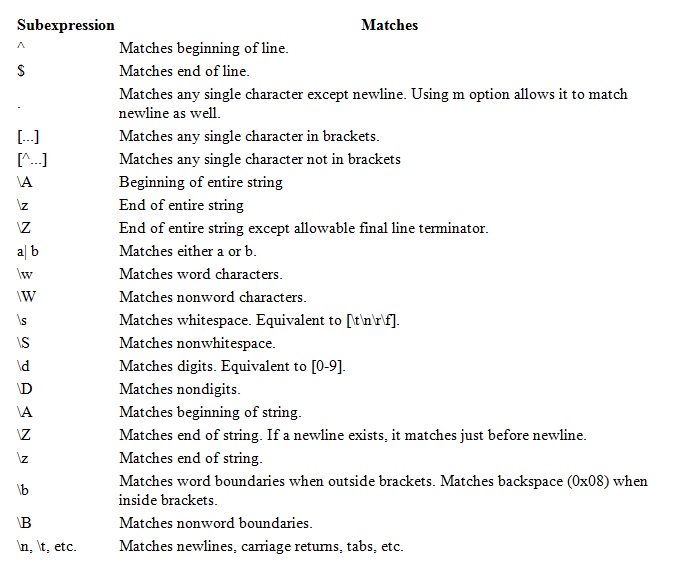
Regex

regex

CODE SNIPET

String regex “\s”;
String input = "Testing the text for regex";
String replace = ”Text to be replaced”;

Pattern pattern = Pattern.compile(regex);
Matcher matcher = pattern.matcher(input);

if(matcher.find()){
   ...
}

Other Functions
Matcher.matches() – returns true or false
Input  = m.replaceAll(replace);

CODE

import java.util.regex.Matcher;
import java.util.regex.Pattern;

public class RegexTestPatternMatcher {
  public static final String EXAMPLE_TEST = "This is my small example string which I'm going to use for pattern matching.";

  public static void main(String[] args) {
    Pattern pattern = Pattern.compile("\\w+");
    Matcher matcher = pattern.matcher(EXAMPLE_TEST);
    // check all occurance
    while (matcher.find()) {
      System.out.print("Start index: " + matcher.start());
      System.out.print(" End index: " + matcher.end() + " ");
    }
  }
}

OR

import java.util.regex.Matcher;
import java.util.regex.Pattern;

public class RegexMatches
{
    public static void main( String args[] ){

      // String to be scanned to find the pattern.
      String line = "This order was placed for QT3000! OK?";
      String pattern = "(.*)(\\d+)(.*)";

      // Create a Pattern object
      Pattern r = Pattern.compile(pattern);

      // Now create matcher object.
      Matcher m = r.matcher(line);
      if (m.find( )) {
         System.out.println("Found value: " + m.group(0) );
         System.out.println("Found value: " + m.group(1) );
         System.out.println("Found value: " + m.group(2) );
      } else {
         System.out.println("NO MATCH");
      }
   }
}

Java Concepts – 2

Difference between an Interface and an Abstract class

  • All methods in an interface are implicitly abstract. On the other hand, an abstract class may contain both abstract and non-abstract methods.
  • A class may implement a number of Interfaces, but can extend only one abstract class.
  • In order for a class to implement an interface, it must implement all its declared methods. However, a class may not implement all declared methods of an abstract class. Though, in this case, the sub-class must also be declared as abstract.
  • Abstract classes can implement interfaces without even providing the implementation of interface methods.
  • Variables declared in a Java interface is by default final. An abstract class may contain non-final variables.
  • Members of a Java interface are public by default. A member of an abstract class can either be private, protected or public.
  • An interface is absolutely abstract and cannot be instantiated. An abstract class also cannot be instantiated, but can be invoked if it contains a main method.

How do you ensure that N threads can access N resources without deadlock ?

  • A very simple way to avoid deadlock while using N threads is to impose an ordering on the locks and force each thread to follow that ordering. Thus, if all threads lock and unlock the threads in the same order, no deadlocks can arise.

Differences exist between Iterator and ListIterator

  • An Iterator can be used to traverse the Set and List collections, while the ListIterator can be used to iterate only over Lists.
  • The Iterator can traverse a collection only in forward direction, while the ListIterator can traverse a List in both directions.
  • The ListIterator implements the Iterator interface and contains extra functionality, such as adding an element, replacing an element, getting the index position for previous and next elements, etc.

Differences exist between HashMap and Hashtable

  • A HashMap allows the existence of null keys and values, while a Hashtable doesn’t allow neither null keys, nor null values.
  • A Hashtable is synchronized, while a HashMap is not. Thus, HashMap is preferred in single-threaded environments, while aHashtable is suitable for multi-threaded environments.
  • A HashMap provides its set of keys and a Java application can iterate over them. Thus, a HashMap is fail-fast. On the other hand, a Hashtable provides an Enumeration of its keys.

Difference between ArrayList and LinkedList

  • An ArrayList is an index based data structure backed by an Array. It provides random access to its elements with a performance equal to O(1). On the other hand, a LinkedList stores its data as list of elements and every element is linked to its previous and next element. In this case, the search operation for an element has execution time equal to O(n).
  • The Insertion, addition and removal operations of an element are faster in a LinkedList compared to an ArrayList, because there is no need of resizing an array or updating the index when an element is added in some arbitrary position inside the collection.
  • A LinkedList consumes more memory than an ArrayList, because every node in a LinkedList stores two references, one for its previous element and one for its next element.

HASHSET

HashSet does not guarantee any insertion orders of the set but it allows null elements. HashSet can be used in place of ArrayList to store the object if you require no duplicate and don’t care about insertion order.

Method Overloading Rules

  • change method signature. Method signature is made of number of arguments, type of arguments and order of arguments
  • only changing the return type of method does not amount to method overloading.
  • So your overloaded method throws the same exception, a different exception or it simply does no throw any exception; no effect at all on method loading.

Method Overriding Rules

  • argument list in overridden and overriding methods must be exactly same
  • return type of overriding method can be child class of return type declared in overridden method.
    public class SuperClass {
       //Overriden method
       public Number sum(Integer a, Integer b) {
           return a + b;
       }
    }
    
    class SubClass extends SuperClass {
       //Overriding method
       @Override
       public Integer sum(Integer a, Integer b) {
                       //Integer extends Number; so it's valid
           return a + b;
       }
    }

private, static and final methods can not be overridden

Overriding method can not throw checked Exception higher in hierarchy than thrown by overridden method. Let’s say for example overridden method in parent class throws FileNotFoundException, the overriding method in child class can throw FileNotFoundException; but it is not allowed to throw IOException or Exception, because IOException or Exception are higher in hierarchy i.e. super classes of FileNotFoundException.

Java Concepts

THROWS VS THROW

1. Throws clause in used to declare an exception and throw keyword is used to throw an exception explicitly.
2. If we see syntax wise, throw is followed by an instance variable and throws is followed by exception class names.
3. The keyword throw is used inside method body to invoke an exception and throws clause is used in method declaration (signature).

Throw:

static{
try {
throw new Exception("Something went wrong!!");
} catch (Exception exp) {
System.out.println("Error: "+exp.getMessage());
}
}

Throws:
public void sample() throws ArithmeticException{
 //Statements

.....

 //if (Condition : There is an error)
ArithmeticException exp = new ArithmeticException();
 throw exp;
...
}

Cloning

By default, java cloning is ‘field by field copy’ i.e. as the Object class does not have idea about the structure of class on which clone() method will be invoked. So, JVM when called for cloning, do following things:

1) If the class has only primitive data type members then a completely new copy of the object will be created and the reference to the new object copy will be returned.

2) If the class contains members of any class type then only the object references to those members are copied and hence the member references in both the original object as well as the cloned object refer to the same object.

In java, if a class needs to support cloning it has to do following things:

           A) You must implement Cloneable
B) You must override clone() method from Object class.

EXAMPLE

Employee cloned = (Employee) original.clone();
System.out.println(cloned.getEmpoyeeId());

Finally 

Finally block will execute even if you put return statement in try block or catch block but finally block won’t run if you call System.exit form try or catch.

Static

non-static variable cannot be referenced from a static context. Static variable belongs to Java class while non-static variable belongs to object. Static variable will keep same value for every object while value of non static variable varies from object to object.

Static fields are initialized at the time of class loading in Java, opposite to instance variable which is initialised when you create instance of a particular class.Static method can not be overridden in Java as they belong to class and not to object. If you try to override a static method with a non-static method in sub class you will get compilation error.

How to access non static variable inside static method or block

public class StaticTest {
    private int count=0;
    public static void main(String args[]) throws IOException {
        StaticTest test = new StaticTest(); //accessing static variable by creating an instance of class
        test.count++;
    }  
}

Yes, we can overload static method in Java.